The boot process for SPARC platform involves 5 phases as shown in the diagram below. There is a slight difference in booting process of a SPARC based and x86/x64 based solaris operating system.
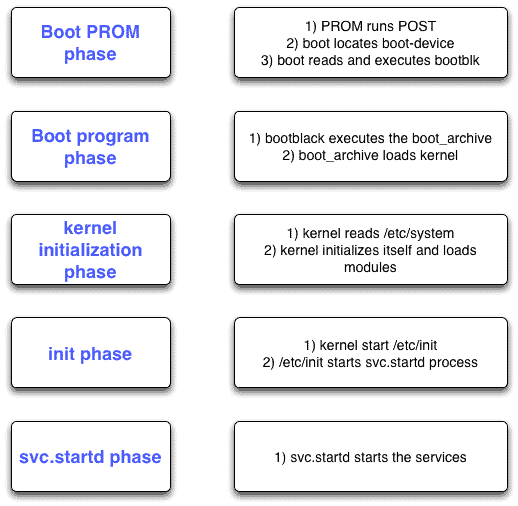
Boot PROM phase
1. The boot PROM runs the power on self test (POST) to test the hardware.
2. The boot PROM displays the banner with below information
– Model type
– processor type
– Memory
– Ethernet address and host ID
3. Boot PROM reads the PROM variable boot-device to determine the boot device.
4. Boot PROM reads the primary boot program (bootblk) [sector 1 to 15] and executes it.
2. The boot PROM displays the banner with below information
– Model type
– processor type
– Memory
– Ethernet address and host ID
3. Boot PROM reads the PROM variable boot-device to determine the boot device.
4. Boot PROM reads the primary boot program (bootblk) [sector 1 to 15] and executes it.
Boot program phase
1. bootblk loads the secondary boot program ufsboot into memory.
2. ufsboot reads and loads the kernel. The kernel is composed of 2 parts :
2. ufsboot reads and loads the kernel. The kernel is composed of 2 parts :
- unix (platform specific kernel)
- genunix (platform independent kernel)
3. ufsboot combines these 2 kernel into one complete kernel and loads into memory.
Kernel initialization phase
1. The kernel reads the configuration file /etc/system.
2. Kernel initializes itself and loads the kernel modules. The modules usually reside in /kernel and /usr/kernel directories. (Platform specific drivers in /platform/‘uname -i‘/kernel and /platform/‘uname -m‘/kernel directories)
2. Kernel initializes itself and loads the kernel modules. The modules usually reside in /kernel and /usr/kernel directories. (Platform specific drivers in /platform/‘uname -i‘/kernel and /platform/‘uname -m‘/kernel directories)
Init phase
1. Kernel starts the /etc/init daemon (with PID 1).
2. The /etc/init daemon starts the svc.startd process which is responsible for starting and stopping the services.
3. The /etc/init daemon uses a file called /etc/inittab to boot up the system to the appropriate run level mentioned in this file.
2. The /etc/init daemon starts the svc.startd process which is responsible for starting and stopping the services.
3. The /etc/init daemon uses a file called /etc/inittab to boot up the system to the appropriate run level mentioned in this file.
Legacy Run Levels
Run level specifies the state in which specific services and resources are available to users.
Run level specifies the state in which specific services and resources are available to users.
0         - system running PROM monitor (ok> prompt)
s or S    - single user mode with critical file-systems mounted.(single user can access the OS)
1         - single user administrative mode with access to all file-systems.(single user can access the OS)
2         - multi-user mode. Multiple users can access the system. NFS and some other network related daemons does not run
3         - multi-user-server mode. Multi user mode with NFS and all other network resources available.
4         - not implemented.
5         - transitional run level. Os is shutdown and system is powered off.
6         - transitional run level. Os is shutdown and system is rebooted to the default run level.
svc.startd phase
1. After kernel starts the svc.startd daemon. svc.startd daemon executes the rc scripts in the /sbin directory based upon the run level.
rc scripts
Now with each run level has an associated script in the /sbin directory.
Now with each run level has an associated script in the /sbin directory.
# ls -l /sbin/rc?
-rwxr--r--   3 root     sys         1678 Sep 20  2012 /sbin/rc0
-rwxr--r--   1 root     sys         2031 Sep 20  2012 /sbin/rc1
-rwxr--r--   1 root     sys         2046 Sep 20  2012 /sbin/rc2
-rwxr--r--   1 root     sys         1969 Sep 20  2012 /sbin/rc3
-rwxr--r--   3 root     sys         1678 Sep 20  2012 /sbin/rc5
-rwxr--r--   3 root     sys         1678 Sep 20  2012 /sbin/rc6
-rwxr--r--   1 root     sys         4069 Sep 20  2012 /sbin/rcS
Each rc script runs the corresponding /etc/rc?.d/K* and /etc/rc?.d/S* scripts. For example for a run level 3, below scripts will be executed by /sbin/rc3 :
/etc/rc3.d/K*
/etc/rc3.d/S*
The syntax of start and stop run scripts is
S##name_of_script - Start run control scripts
K##name_of_scrips - Stop run control scripts
Note the S and K in caps. Scripts starting with small s and k will be ignored. This can be used to disable a script for that particular run level.
Comments
Post a Comment